
LogoShipdirs
  • Discover
  • Search
  • Categories
  • Pricing
  • Blog
  • Submit
LogoShipdirs

Newsletter

Join the Community

Subscribe to our newsletter for the latest news and updates

  1. Home
  2. Category
  3. Tabbit Browser
Tabbit Browser logo

Tabbit Browser

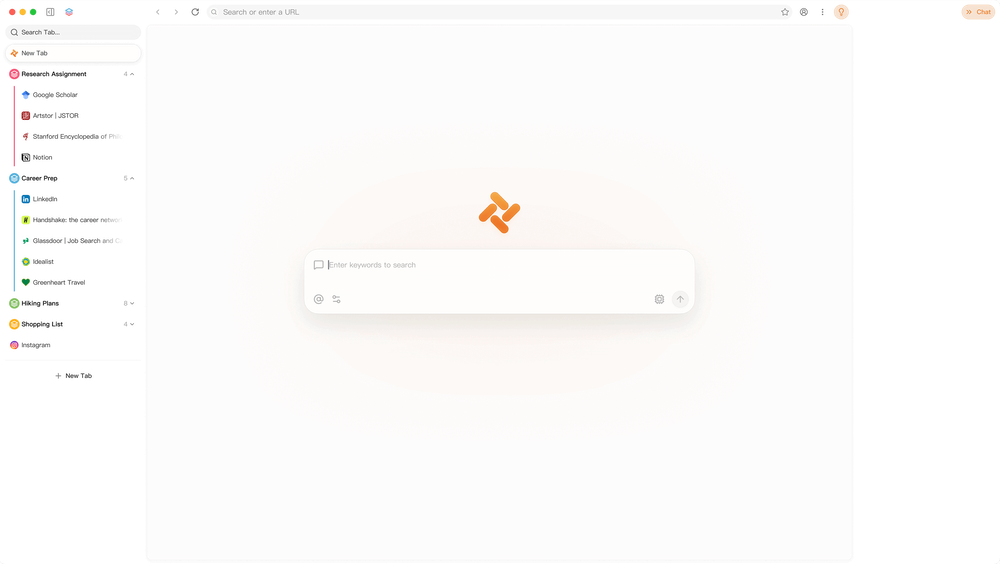
An AI-native browser combining contextual chat, web automation, research, tab organization, and reusable Skills.

Visit Website
Tabbit Browser product preview
Visit Website

Introduction

Back

Information

  • Publisher
    pushtimepushtime
  • Websitewww.tabbit.ai
  • Published date2026/09/08

Categories

  • Productivity & Collaboration
  • Research & Analysis
  • AI & Automation

Tags

  • AI Powered
  • AI Browser
  • Browser Automation
  • Research
  • Productivity
  • Multi-Model
  • Document Generation
  • Workflow Automation
icon of DDSM批量二维码生成器

DDSM批量二维码生成器

AD

专业的DDSM批量二维码生成工具,在线快速生成多个高质量二维码,支持自定义样式、格式导出与打包下载。

How to Use Tabbit Browser

Tabbit Browser's Core Features

Context-aware AI chat

Understands selected tabs, screenshots, highlights, files, PDFs, and desktop context.

Web automation

Performs multi-step browser actions from natural-language instructions.

AI research

Collects, compares, and synthesizes information from multiple sources.

Reusable Skills

Saves recurring browsing and productivity workflows for repeat execution.

Tab organization

Helps users manage and reason across many open webpages.

Work-product generation

Creates HTML, PDFs, presentations, and other deliverables from gathered context.

Multi-model support

Works with leading proprietary and open AI model providers.

Browser migration

Imports common browsing data and settings from existing browsers.

Tabbit Browser's Use Cases

1

Market research

Compare products, companies, and sources across multiple tabs.

2

Web task automation

Delegate repetitive browsing sequences to a context-aware agent.

3

Document analysis

Discuss webpages, PDFs, screenshots, and local files in one workspace.

4

Report creation

Turn collected research into structured documents and presentations.

5

Personal browsing workflows

Save recurring routines as reusable Skills for faster execution.

FAQ from Tabbit Browser

Tabbit Browser Support & Company Information

Support Email
partnerships@tabbit.ai

Social Links

  • Twitter
  • Instagram
  • TikTok
  • YouTube

More Products

icon of AI Game Makers

AI Game Makers

Developer ToolsAI & Automation

Roblox AI game maker: type one sentence and the AI builds a full game with map, scripts and UI. No coding. Preview it in 3D, then open it in Roblox Studio.

AI GamingGame DevelopmentNo CodeFree Plan3D Worlds
icon of Roblox Thumbnail Maker

Roblox Thumbnail Maker

AI & AutomationDesign & Creative

Create eye-catching Roblox game thumbnails with AI using reference images, genre presets, and customizable visual styles.

AI GamingAI PoweredCreator ToolsGame AssetsGame Development+3
icon of Tunenoodle

Tunenoodle

AI & AutomationAudio & Music

Turn an idea, lyrics or a hummed melody into a song with AI, plus 30+ free browser audio tools like audio to MIDI, tap tempo and a chord analyzer.

AI PoweredAudio ToolsMusic ProductionFree Plan

Tabbit Browser is an AI-native, context-aware web browser that combines everyday browsing with AI chat, research, automation, tab organization, and reusable Skills. Its agent can work with webpages, screenshots, highlights, local files, PDFs, and desktop context.

Users can ask the browser to research topics, analyze information, automate web actions, and generate HTML, PDFs, presentations, or other work products. Support for GPT, Claude, Gemini, DeepSeek, Kimi, Qwen, and other providers gives teams flexibility over the models used for each workflow.

  1. Download Tabbit for macOS or Windows and complete the browser setup.
  2. Optionally import history, bookmarks, extensions, and settings from another browser.
  3. Open the AI sidebar and add tabs, highlights, screenshots, PDFs, or local files as context.
  4. Ask the Tabbit Agent to research, compare, summarize, create a document, or perform web actions.
  5. Save useful repeatable workflows as Skills for later use.
LogoShipdirs

A curated directory of tools that help you build, create, and grow.

Explore
  • Discover
  • Search
  • Categories
Resources
  • Blog
  • Pricing
  • Submit
More
  • Sitemap
  • Contact
Company
  • About Us
  • Privacy Policy
  • Terms of Service

Featured on

Listed on Turbo0Featured on DeepLaunch.ioFeatured on SumoDirFeatured on First LookFeatured on SaaSTool.siteShipdirs is listed on publishyoursaasFeatured on Wired BusinessFeatured on Twelve ToolsFeatured on Dofollow.ToolsFazier badgeaitoolexListed on Backlink DirsLaunching Soon on UneedListed on AIDirsFeatured on FWFWFeatured on NewTool.siteAidirsFeatured on BestskyToolsListed on JustSimple ToolsFeatured on AIJustBetter.comFeature On aifinderplus.comFeatured on AITrustListFeatured on aihuntlist.comFeatured on ToolListed
Copyright © 2026 All Rights Reserved.